


When childcare information is scattered between paper sign-in sheets, messages, invoices, and separate notes, even a normal day can become harder than it needs to be. Procare: Childcare App is designed for that exact environment: it brings daily childcare records, arrival and departure tracking, and billing-related work into one place. I found it most useful when I treated it less like a parent-facing messaging app and more like a shared operating system for a childcare center.
That distinction matters. Families may open it to check the practical side of a child’s day, while staff use it to keep the center’s routine organized. The experience depends heavily on how the childcare provider has configured and adopted the service, so this is not an app that makes much sense as a standalone download. It becomes valuable when the center, school, or program already uses Procare as part of its daily workflow.
From morning arrival to end-of-day records
The starting condition: a busy childcare morning
I picture the most realistic use case as a busy morning at a childcare center. Several families arrive close together, staff need to identify who is entering, attendance has to remain accurate, and parents may later need a clear record of the day. At the same time, the administrative side of the center still has to keep up with schedules and billing.
Without a connected system, these jobs can easily become separate chores. A paper sheet may record attendance, a message thread may contain an update, and an office spreadsheet may handle payment information. The risk is not only wasted time. It is also the small gap between what one person knows and what the next person can see.
Procare addresses this by connecting the practical childcare record with the administrative process. Its focus on childcare management makes it more specialized than a general calendar, chat app, or family organizer. I would not install it expecting a broad parenting toolkit. I would choose it because a childcare provider is using it to coordinate the day.
The app is free to download, which removes an obvious barrier for families and staff who need access. It is rated for Everyone, and the developer is Procare Solutions LLC. The current version is 6.6.0, with a minimum operating system requirement of 11, so anyone preparing a device should check that the phone or tablet meets that requirement before relying on it at the entrance desk.
Step one: recording arrival and departure
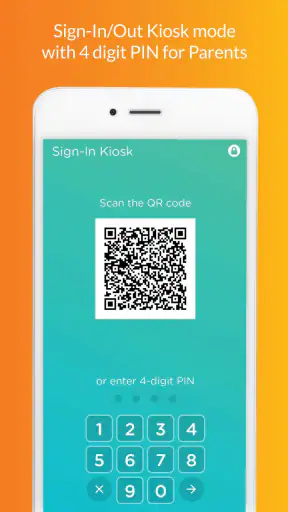
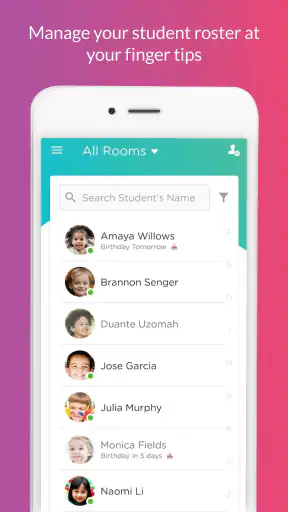
The first useful handoff happens at sign-in. Instead of treating arrival as an isolated mark on a sheet, the center can use the app’s sign-in and sign-out workflow as part of the child’s attendance record. In everyday terms, that means the arrival event has a clearer place to go, and the later departure can be connected to the same operational record.
That sounds simple, but the value is in consistency. If one staff member handles the entrance while another takes over the classroom, a shared digital record is easier to follow than a handwritten mark left on a counter. I also see a practical benefit for parents: the act of dropping off or collecting a child becomes part of an established routine rather than another message that someone must manually interpret.
My advice is to make sign-in and sign-out a deliberate habit instead of rushing through it. The app can organize the workflow, but it cannot correct an entry made for the wrong child or a departure that was forgotten. Centers should decide who is responsible for checking the record during busy transitions, because digital tracking is only as reliable as the routine around it.
Step two: turning the day into a usable record
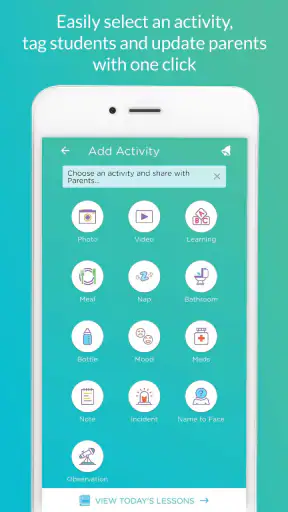
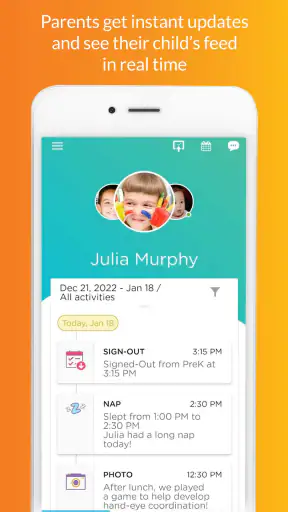
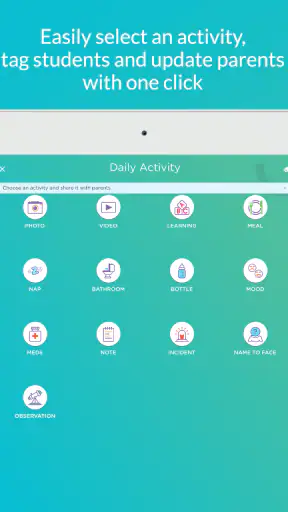
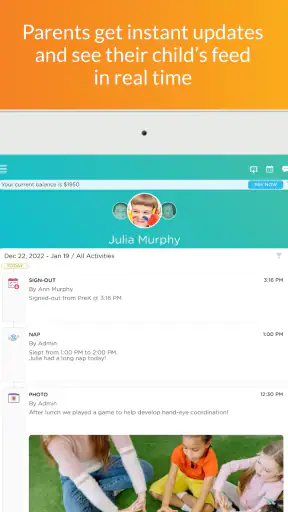
After arrival, the app’s daily-sheet function becomes more relevant. A daily sheet is useful because it changes the question from “What happened at some point today?” to “What information should be available when the family needs a summary?” For a parent, that can make pickup conversations more concrete. For staff, it creates a place to keep the day’s information organized rather than relying entirely on memory.
This is one of the less obvious strengths of a childcare-specific tool. A general notes app can store text, but it does not naturally connect that note to attendance and the center’s administrative workflow. Procare’s value is the relationship between those pieces. The record is not merely a diary; it supports the handoff from classroom activity to family communication and office administration.
I would still avoid assuming that every center uses the daily sheet in exactly the same way. The quality of the result depends on how consistently staff enter information and how clearly the center has agreed on what belongs there. A short, timely entry is usually more useful than a long update completed much later, when details may be harder to reconstruct.
Step three: keeping the office side connected
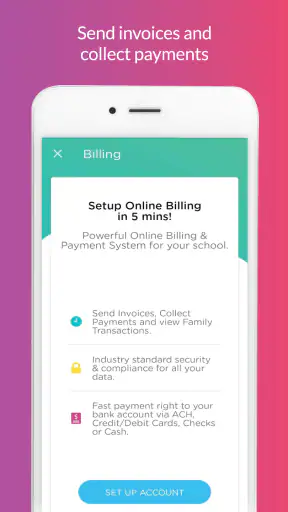
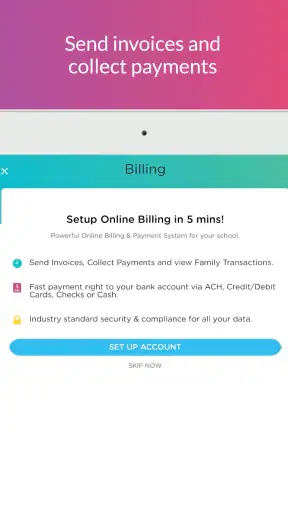
The next stage is billing. This is where Procare separates itself from many ordinary childcare communication tools. A family may think primarily about attendance and daily updates, but the center also needs to connect care arrangements with payment administration. Keeping those activities within the same childcare management environment can reduce the need to reconcile unrelated systems.
I appreciate the idea of this connection, although it also raises the importance of careful setup. Billing is not an area where users want ambiguity. Families should review the center’s instructions before assuming that every payment question can be solved from the mobile app alone. The app gives the process a central home, but the provider’s configuration and office procedures still determine what the user can do and what requires staff assistance.
For a small center, the advantage is not just convenience. A shared system can make it easier to compare attendance information with the administrative record when a question comes up. For a larger operation, the benefit is more about reducing disconnected steps between classroom staff, front-desk workers, and the people handling accounts.
The handoffs that make the workflow work
The most important part of this app is not any single screen. It is the handoff between people. A parent arrives, a staff member records the transition, classroom staff maintain the child’s daily information, and the office relies on organized records for administrative work. Each person needs a different view of the same underlying routine.
That makes Procare a better fit for organizations than for individual families. A parent using a standalone note-taking app may be able to record reminders, but that information does not automatically become part of the center’s attendance or billing process. Conversely, a center using only a messaging service may communicate quickly while still keeping formal records somewhere else.
I found the handoff concept especially important for substitute staff and shift changes. When responsibility moves from one employee to another, a current digital record is more useful than a verbal recap that may be incomplete. The trade-off is that staff need a shared understanding of how to enter information. If each person uses different wording, timing, or habits, the system can become technically centralized but practically inconsistent.
For parents, the handoff is simpler but still meaningful. The app can give them a more direct connection to the center’s established process, rather than requiring them to remember which channel handles attendance, daily information, or account questions. I would encourage families to use it as the center intends and to contact the provider when a record looks wrong instead of trying to create a parallel system that splits the information again.
A realistic day from input to outcome
Imagine a parent arriving in a hurry before work. The child is checked in, the classroom receives the child, and staff later maintain the daily record. At pickup, the departure is recorded, giving the center a clearer attendance trail. If the parent later needs to understand the day or discuss an account matter, the relevant information has a better chance of being connected to the same childcare operation.
The outcome is not dramatic automation. It is fewer loose ends. The parent spends less time wondering where a routine record belongs, staff spend less time translating between paper and digital notes, and the office has a more coherent basis for handling administrative questions. That is the kind of improvement I expect from this app: not entertainment, but a reduction in friction across repeated childcare tasks.
Its popularity supports that impression without being the only reason to consider it. Procare has passed one million installs and holds a 4.6 average from around 51 thousand ratings, alongside roughly 10 thousand written reviews. Those figures suggest that it is established enough to be familiar to many users, but they do not replace the more important question: does your childcare provider actually use its workflow consistently?
Where the flow breaks
The first weak point is dependence on the center. If your provider does not use Procare, downloading it will not create a useful record by itself. Even when the center does use it, your experience may vary according to how thoroughly staff maintain daily sheets, how the office handles billing tasks, and how clearly families are shown the correct process.
The second issue is that a centralized workflow can feel restrictive when you only want a quick personal note. Families who prefer a simple calendar or messaging app may find Procare more involved than necessary for their own planning. It is built around the relationship between family and childcare provider, not around unrestricted personal customization.
There is also a human cost to digital consistency. Staff must remember to complete the right step at the right time, especially during crowded arrival and pickup periods. A center that moves from paper to an app without training or clear responsibility may simply relocate confusion from a clipboard to a screen. In that situation, the technology is not the main problem; the workflow needs attention.
Billing is another area where expectations should remain realistic. Bringing billing into a childcare platform is useful, but account questions can still require communication with the center. I would not choose Procare solely because I want every financial issue resolved instantly from a phone. Its stronger promise is centralization, not the elimination of all administrative conversations.
Finally, device compatibility deserves a quick check. The app requires iOS or Android equivalent to operating system version 11 or later. That is not an unusual demand for a current mobile app, but it can matter if a center keeps an older tablet at the front desk or a family relies on an aging phone. A workflow that depends on one device should be tested before the device becomes essential.
Who should use it, and who should look elsewhere?
I would recommend Procare to families whose daycare, preschool, or childcare center already relies on it, especially when attendance, daily sheets, and account administration have previously been split across different channels. In that situation, the app can make the routine easier to follow and give each handoff a more dependable place.
It is also a sensible choice for childcare organizations that want one environment for operational records rather than separate tools for sign-in, daily information, and billing. The strongest benefit appears when the whole team follows the same process. A partial rollout will not deliver the same value as a center-wide habit.
I would skip it as a personal download if your provider does not support it, or if you only need a private family calendar and occasional reminders. A general organizer may be faster for that narrow purpose. I would also be cautious if you expect a highly customizable communication platform; Procare’s appeal is its childcare-specific structure, and structure can feel limiting when your needs are informal.
My final assessment after following the workflow
Procare is a practical Education app with a clear job: connect the repeated steps that make childcare administration work. I like it most when I follow the complete path from arrival, through the daily record, to departure and office follow-up. That end-to-end view explains why it can be more useful than a collection of ordinary apps, even if no single feature feels revolutionary on its own.
The app was released on February 28, 2018, and its continued presence, free availability, and broad adoption make it a familiar option for centers and families. Still, I would judge it by implementation rather than reputation. A well-run center can turn it into a dependable shared record; an inconsistent process can make any digital tool feel frustrating.
My honest recommendation is straightforward: use Procare when your childcare provider has made it part of the daily routine. Take a moment to learn exactly how sign-in, daily sheets, pickup, and billing are handled, and treat accuracy at each handoff as part of the system. If you want a private family planner or your center uses another platform, this is probably not the right app for you. For the childcare organizations it fits, however, it offers a focused way to turn a scattered day into a more traceable one.


